
6 min read
QBCore vs Qbox: APIs, Compatibility and Migration Differences
Qbox began as a QBCore-derived framework, but qbx_core and qb-core are now distinct cores with
different native APIs, dependencies and resource architecture.
The important question is therefore not "which name is better?" It is whether your resources use interfaces that are native to the target framework or covered by Qbox's QB compatibility bridge.
This comparison is based on current project documentation and source. It does not claim that one framework is universally faster, safer or more production-ready. Test the exact revisions and integrations you plan to deploy.
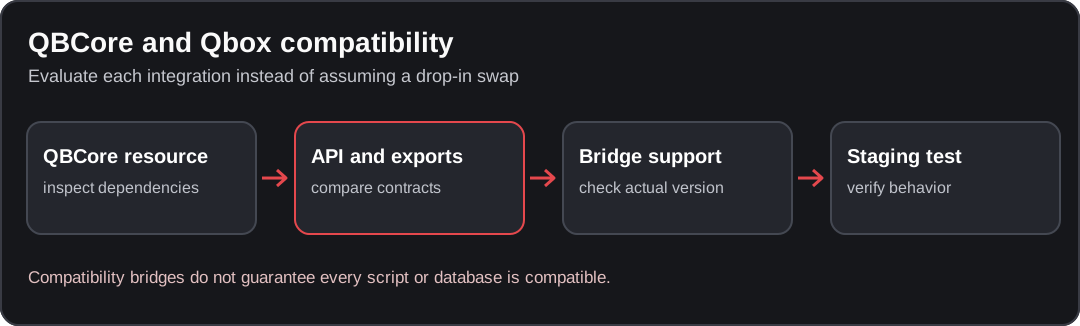
Conceptual diagram; verify the behavior against your installed resource version.
QBCore vs Qbox at a glance
| Area | QBCore (qb-core) | Qbox (qbx_core) |
|---|---|---|
| Core identity | QBCore's qb-core resource | Qbox's qbx_core resource |
| Primary API style | QBCore Core Object plus exports/events/functions | Export-oriented qbx_core APIs plus optional QB compatibility bridge |
| QBCore compatibility | Native | Qbox documents backward compatibility for most resources using supported QBCore interfaces |
| Core-object behavior | exports['qb-core']:GetCoreObject() returns the QBCore Core Object | Qbox has no native QBCore Core Object; its QB bridge can expose compatible qb-core behavior |
| Core dependency baseline | Current qb-core manifest declares oxmysql | Qbox currently documents oxmysql, ox_lib and ox_inventory as qbx_core dependencies |
| Resource ecosystem | Official/community qb-* resources and QBCore integrations | Native qbx-*/Qbox resources, Overextended integrations, plus bridged QB resources where compatible |
| Migration risk | Existing QBCore behavior is already native | Risk depends heavily on direct DB access, core-file access, custom patches and unsupported API usage |
Sources:
QBCore Core Object,
current qb-core manifest,
Qbox FAQ, and
qbx_core README.
1. Core architecture
QBCore
QBCore resources commonly obtain the framework object with:
local QBCore = exports['qb-core']:GetCoreObject()The Core Object exposes framework functions and shared structures used across the QBCore ecosystem. QBCore's current documentation also supports filtered Core Object access so a resource does not need to import every available table.
Read the local Core Object reference for the QBCore side.
Qbox
Qbox's native core is qbx_core. Its project documentation describes an export-based API and a
different native architecture. Qbox explicitly states that it does not have the QBCore Core
Object.
When the QB bridge is enabled, compatibility code can still service common QBCore-style exports and
events. That bridge is an interoperability layer, not evidence that qbx_core and qb-core are the
same implementation.
Qbox documents the bridge convar as:
setr qbx:enableBridge "true"See the Qbox convar reference.
2. Will QBCore scripts work on Qbox?
Qbox's FAQ says most QBCore resources can work through its compatibility bridge when they use documented and proper QBCore interfaces.
Qbox lists important exceptions, including resources that:
- access framework database tables directly,
- read or modify internal core files,
- use existing functions in unsupported ways,
- depend on implementation details that the bridge does not reproduce.
That means a marketing label such as "QBCore script" is not enough to predict Qbox compatibility.
Compatibility review
Before moving a QBCore resource to Qbox, record:
- every
qb-coreexport it calls, - every QBCore event/callback it registers or triggers,
- every direct SQL query against framework-owned tables,
- every file imported directly from
qb-core, - inventory, target, phone, banking, housing and garage dependencies,
- any custom patch applied to the existing QBCore core.
Then compare those dependencies with the current Qbox bridge and native Qbox APIs.
3. Dependencies and ecosystem choices
Current qb-core declares oxmysql as a core dependency.
The current qbx_core README lists:
oxmysql,ox_lib,ox_inventory.
This matters because a migration can be broader than swapping the core resource. Inventory, interaction libraries and other ecosystem components may own persistent data or APIs used by your custom resources.
Do not assume that a resource is migration-safe because it starts without an error.
If you replace resources instead of porting them, compare declared framework support and dependencies on listings such as the Qbox scripts on RPScripts. RPScripts and qbcore.net are operated by the same owner. A listing is not proof of compatibility.
4. Core Object vs native Qbox exports
For new QBCore code, use the documented QBCore interfaces for the QBCore version you deploy.
For native Qbox code, prefer the documented qbx_core exports rather than writing new code against a
legacy compatibility surface solely because existing QB resources use it.
This makes the integration boundary explicit:
- existing QBCore resource → bridge only if its used interfaces are covered,
- new Qbox-native resource →
qbx_coreAPIs, - new QBCore-native resource → QBCore APIs.
Qbox's documentation notes that converting a compatible resource to native Qbox APIs is not required just to make the bridge work; conversion can still reduce dependency on the compatibility layer.
5. Migration from QBCore to Qbox
Treat migration as a data-and-integration project, not a framework rename.
Inventory your current stack
Create a table for every resource:
| Resource | QBCore APIs used | Direct DB/core access | Inventory/target/UI dependency | Bridge status | Migration action |
|---|---|---|---|---|---|
| Example resource | Record exact exports/events | Yes/No | Record exact names | Verified/Unverified | Keep, adapt, replace or remove |
Do not fill the bridge-status column from assumptions. Verify it against current upstream documentation/source or a staging test.
Back up persistent state
Before changing framework or inventory behavior, back up:
- database,
- resource configuration,
- custom core/resource patches,
- item/job/gang definitions,
- migration scripts.
Document how you would roll back after players begin creating new state on the migrated server.
Migrate on a copy
Run the migration against staging data first. Validate at minimum:
- character load and reconnect,
- money/accounts,
- inventory and metadata,
- jobs/gangs and grades,
- owned vehicles/property,
- permissions,
- resource callbacks/events,
- restart persistence.
Compare before/after record counts and sample ownership relationships where applicable.
Remove assumptions one by one
A resource with direct QBCore database or file access should be treated as a migration task even if the QB bridge covers its public exports.
Prefer an explicit adapter or native integration over two cores independently writing the same state.
6. When staying on QBCore is the lower-change path
Staying on QBCore usually changes less when your current server:
- has substantial QBCore-specific custom code,
- patches
qb-coreor officialqb-*resources, - depends on integrations not verified against Qbox,
- has no current migration requirement that justifies data/integration work.
This is a change-scope observation, not a claim that QBCore is universally better.
7. When evaluating Qbox is reasonable
A Qbox evaluation is reasonable when you can:
- inventory every critical integration,
- verify bridge behavior for existing QB resources,
- adopt required Qbox/Overextended dependencies deliberately,
- migrate persistent data on staging,
- replace unsupported direct core/database access,
- prove rollback before production cutover.
This is not a recommendation to migrate solely for performance. Measure the actual bottleneck first.
Performance claims
Do not use generic statements such as "Qbox is faster" or "QBCore is faster" as migration evidence.
Framework performance depends on:
- the exact core/resource revisions,
- resource count and behavior,
- database queries,
- NUI workload,
- loops/events,
- player load,
- server hardware and configuration.
Use FiveM profiling and equivalent staging scenarios when performance is the reason for considering a migration.
See QBCore performance guidance.
Related comparisons and migration guides
All FiveM frameworks
Compare QBCore, Qbox, ESX and other frameworks without turning pairwise migration details into a duplicate broad ranking page.
QBCore vs ESX
Review the architecture and migration boundary between QBCore and ESX.
Migration planning
Inventory integrations, persistent data, cutover checks and rollback before changing frameworks.
Source notes
This page was reviewed on 27 September 2026 against current public QBCore and Qbox sources linked above. Qbox compatibility statements are attributed to Qbox's own bridge/FAQ documentation and should be rechecked against the exact Qbox revision you plan to deploy.
No synthetic benchmark, universal compatibility claim, or migration success rate is presented here.
Found an issue in this guide?
Send the page URL, the affected example, and a source or reproduction to the site maintainer. For a server or resource problem, use the support guide.
