
6 min read
qb-target
qb-target registers interactions on zones, entities, models and bones. Its manifest requires PolyZone; the README describes QBCore as optional. The job/item examples here assume QBCore is enabled. The API reference is pinned to a3ea78b2; the application examples below are original, source-reviewed examples, not claimed in-game test results.
Choose the smallest scope: one fixed location uses a zone; one spawned NPC uses AddTargetEntity; every instance of an allowed model uses AddTargetModel. Do not globally target every prop when only one object should be interactive.
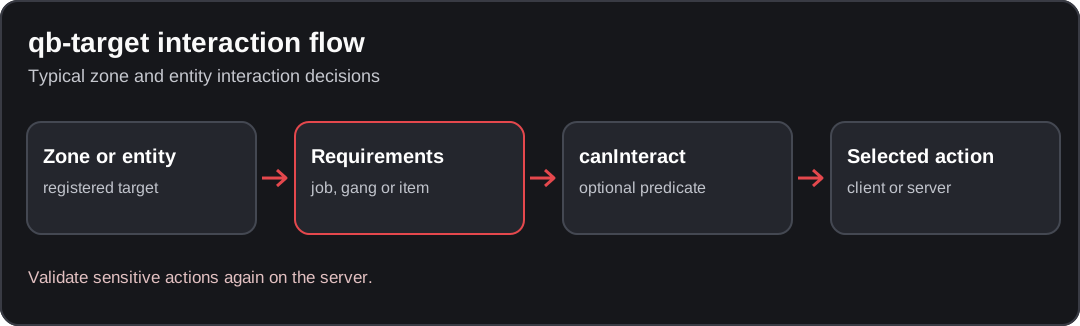
Conceptual diagram; verify the behavior against your installed resource version.
Considering a replacement? Follow the ox_target setup and migration guide for API conversion and stock-QBCore job-filter limitations. It is not a resource-name swap.
Installation and a complete first interaction
Keep the exact resource folder names, including PolyZone capitalization on Linux. Do not copy qb-target exports into a server file: registration happens on the client.
Create resources/[custom]/docs_target/fxmanifest.lua:
fx_version 'cerulean'
game 'gta5'

dependencies { 'qb-core', 'PolyZone', 'qb-target' }
client_script 'client.lua'
Start dependencies before this resource, retaining the rest of your recipe's existing startup sequence:
ensure qb-core
ensure PolyZone
ensure qb-target
ensure docs_target
Create docs_target/client.lua with this complete BoxZone example. The coordinates are illustrative: move the counter to a reachable location in your map and verify the height with debug drawing.
local counter = vector3(441.2, -981.9, 30.7)
local zoneNames = { 'docs_counter', 'docs_circle', 'docs_polygon' }
local clerk

local function targetOptions()
    return {
        options = {
            {
                icon = 'fas fa-info-circle',
                label = 'Inspect training counter',
                action = function()
                    print('[docs_target] interaction reached the client')
                end
            }
        },
        distance = 2.0
    }
end

exports['qb-target']:AddBoxZone('docs_counter', counter, 1.4, 1.0, {
    name = 'docs_counter',
    heading = 0.0,
    minZ = 29.7,
    maxZ = 31.7,
    debugPoly = true
}, targetOptions())

AddEventHandler('onResourceStop', function(resource)
    if resource ~= GetCurrentResourceName() then return end
    if GetResourceState('qb-target') == 'started' then
        for _, name in ipairs(zoneNames) do
            exports['qb-target']:RemoveZone(name)
        end
        if clerk and DoesEntityExist(clerk) then
            exports['qb-target']:RemoveTargetEntity(clerk, 'Inspect training counter')
        end
    end
    if clerk and DoesEntityExist(clerk) then DeleteEntity(clerk) end
end)
Walk within interaction distance, use your configured targeting key and select the option. Expected evidence is the [docs_target] message in F8. A green debug outline only proves that the zone was drawn; it does not prove the option filters or action work. Disable debugPoly after verification.
Zone exports and parameters
| Client export | Geometry arguments | Options to inspect |
|---|---|---|
AddCircleZone(name, center, radius, options, targetoptions) | Unique name, vector3 center, radius | useZ controls whether height participates in the circle check |
AddBoxZone(name, center, length, width, options, targetoptions) | Center and horizontal dimensions | heading, minZ, maxZ, debugPoly |
AddPolyZone(name, points, options, targetoptions) | An ordered array of vector2 polygon points | minZ, maxZ, debugPoly; do not cross polygon edges |
RemoveZone(name) | The exact registration name | Remove the registration on resource stop or when replacing it |
The final targetoptions table contains options = { ... } and distance. It is separate from the geometry options table. Length/width/radius define the zone; distance defines interaction reach. Increasing reach will not repair a zone drawn on the wrong floor.
AddCircleZone
As an alternative or an additional distinct zone, add this in the same client file, below the targetOptions helper:
exports['qb-target']:AddCircleZone('docs_circle', counter, 1.0, {
    name = 'docs_circle',
    useZ = true,
    debugPoly = true
}, targetOptions())
With useZ = true, position the center at the actual interaction height. Avoid overlapping this with the BoxZone while diagnosing which registration is active.
AddPolyZone
For an irregular footprint, add this in the same client file. Replace these sample points with measured coordinates in perimeter order:
exports['qb-target']:AddPolyZone('docs_polygon', {
    vector2(440.0, -984.0),
    vector2(443.0, -984.0),
    vector2(443.0, -981.0),
    vector2(441.0, -980.0)
}, {
    name = 'docs_polygon',
    minZ = 29.7,
    maxZ = 31.7,
    debugPoly = true
}, targetOptions())
Both optional zone names are already included in the cleanup list. If you rename a zone, update its cleanup name too.
NPC and entity interactions
AddTargetEntity(entity, parameters) takes an entity handle, not a model hash or a server player ID. The implementation handles network-ID conversion internally for networked entities. AddTargetModel(models, parameters) instead targets instances of the specified models.
For a local, non-networked demonstration NPC, append this to the same client file. It uses the clerk variable and cleanup handler already declared above:
CreateThread(function()
    local model = joaat('s_m_m_security_01')
    if not IsModelInCdimage(model) or not IsModelAPed(model) then return end
    RequestModel(model)
    local started = GetGameTimer()
    while not HasModelLoaded(model) do
        if GetGameTimer() - started > 5000 then
            SetModelAsNoLongerNeeded(model)
            print('[docs_target] NPC model timed out')
            return
        end
        Wait(50)
    end

    clerk = CreatePed(4, model, counter.x, counter.y, counter.z - 1.0, 180.0, false, false)
    SetModelAsNoLongerNeeded(model)
    if not DoesEntityExist(clerk) then return end
    FreezeEntityPosition(clerk, true)
    SetEntityInvincible(clerk, true)
    SetBlockingOfNonTemporaryEvents(clerk, true)
    exports['qb-target']:AddTargetEntity(clerk, targetOptions())
end)
This intentionally creates one local NPC per client. It is not a server-authoritative mission entity or a persistent NPC system. Use your server's entity lifecycle for those cases. Remove the target before deleting or replacing its entity.
Job, gang, item and canInteract conditions
Add conditions to an individual option, not to the outer geometry table:
{
    icon = 'fas fa-id-badge',
    label = 'Police equipment desk',
    job = { police = 2 },
    item = 'handcuffs',
    canInteract = function()
        local data = exports['qb-core']:GetCoreObject().Functions.GetPlayerData()
        return data.job ~= nil and data.job.onduty == true
    end,
    action = function()
        print('[docs_target] visible for the configured job, grade, item and duty state')
    end
}
This option requires the configured job/grade, the item and the custom duty condition. A job table permits alternative job/grade pairs within that table; adding an item condition does not turn those checks into an OR rule. Use gang = { ballas = 0 } for a gang restriction where appropriate.
Keep canInteract quick and synchronous. Do not query the database, wait for a callback or run a long loop inside it. Start with an unfiltered option, verify the action, then add one condition at a time.
Client visibility is not authorization
action runs a function; type plus event dispatches an event. An action replaces event dispatch for that option. Do not assume both run.
For actions involving money, inventory, duty or ownership, the server must independently validate the player, permitted job/grade, location, relevant state and requested operation. Never accept a client-provided price or reward merely because its target was hidden from unauthorized players. The complete qb-menu duty example shows a server-validated action; safe server events covers the general pattern.
Why does my target not appear?
| Observation | Inspect | Expected correction |
|---|---|---|
No such export AddBoxZone | Resource state, exact name, first startup error | Fix the dependency or incompatible caller before geometry |
| PolyZone global is nil | Installed PolyZone and target manifest/startup | Load the required dependency; do not insert guessed globals |
| No outline with debug enabled | Whether registration code ran, coordinates and height | Log immediately before registration and inspect the measured location |
| Outline visible, no usable option | Targeting key, reach and per-option filters | Test one unfiltered option, then add conditions individually |
| NPC visible, no target | Valid entity handle and registration timing | Register after CreatePed, not with its model hash |
| Several identical options | Duplicate registration or missing cleanup | Remove by zone name or entity/model option label |
| Option visible but click does nothing | action versus event, handler name and client/server side | Log the client action and the authorized server handler separately |
| Worked until qb-target restarted | The dependency lost runtime registrations | Restart dependent custom resources in a coordinated staging test |
See resource load order and keybindings. Do not fix a target failure by disabling server authorization.
Add a sit option to chair models
There is no safe universal “any prop chair” registration: model origins, heading and seat height differ. In a separate client example, register only tested models:
local chairModels = { joaat('prop_chair_01a'), joaat('prop_chair_04a') }

exports['qb-target']:AddTargetModel(chairModels, {
    options = {
        {
            icon = 'fas fa-chair',
            label = 'Sit',
            action = function(entity)
                local coords = GetEntityCoords(entity)
                TaskStartScenarioAtPosition(
                    PlayerPedId(), 'PROP_HUMAN_SEAT_CHAIR_MP_PLAYER',
                    coords.x, coords.y, coords.z, GetEntityHeading(entity), 0, true, true
                )
            end,
            canInteract = function(entity)
                return DoesEntityExist(entity) and not IsPedInAnyVehicle(PlayerPedId(), false)
            end
        }
    },
    distance = 1.5
})

AddEventHandler('onResourceStop', function(resource)
    if resource ~= GetCurrentResourceName() then return end
    if GetResourceState('qb-target') == 'started' then
        exports['qb-target']:RemoveTargetModel(chairModels, 'Sit')
    end
    ClearPedTasks(PlayerPedId())
end)
Test each model at several headings. Use per-model offsets when the scenario sits beside the chair; increasing interaction distance cannot fix seat alignment.
Update checklist
Record the deployed commit before changing config.lua, registration.lua, client.lua or data/. On staging, verify add/remove, model/entity scope, every filter, click dispatch, denied server requests and resource restart cleanup. These are manual acceptance checks, not executed FiveM results for this guide.
Sources
- Registration implementation: zone signatures, entity handling and removal.
- Templates: option shape and filters.
- README and manifest.
Found an issue in this guide?
Send the page URL, the affected example, and a source or reproduction to the site maintainer. For a server or resource problem, use the support guide.
qb-radio
Source-verified qb-radio setup for pma-voice, job and gang channel restrictions, radio items and troubleshooting access problems.
qb-radialmenu
Add a complete QBCore radial-menu action with its own resource, distinguish keybinds from handlers, and troubleshoot missing options without bypassing permissions.
