
Updated 2026-10-02 · 3 min read
🛡️ Safe Server Events
A client can call a network event without using your interface. Check authorization and input in the server handler itself. Cfx.re's event-security guide distinguishes network events from same-context handlers and explains why gameplay values must be checked server-side.
Use the server-authority checklist when reviewing actions that change money, items, permissions, or persistent state.
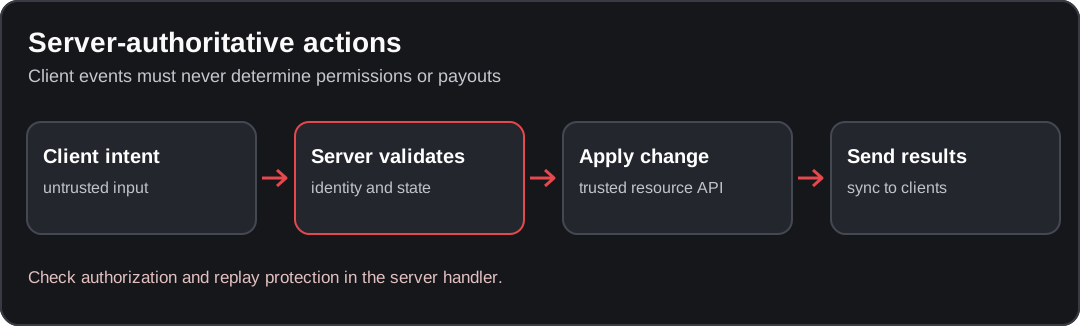
Conceptual diagram; verify the behavior against your installed resource version.
Threat model
Expect missing or malformed arguments, unauthorized callers, repeated requests, and a player disconnecting before the operation finishes. A client-supplied price, grade, target, or permission flag is a request to evaluate, not a fact to trust.
Principles for secure events
Expose only the operations clients need. Use AddEventHandler for a server-only event rather than registering it for network use. For a network request, capture source immediately, validate the caller and payload, and derive sensitive values from server-owned state.
Staff authorization and gameplay authorization are different: a job named admin is not an ACE grant. Check the permission required by the particular operation.
Implementation example
This small example lets an authorized player request their own current job name. It is deliberately read-only: it does not grant items, transfer money, escort another player, or implement an anti-cheat. The docs:* event names and docs.read-job ACE below belong to this example, not to the QBCore API.
Create a test resource named docs-job-check with these three files. It requires a running qb-core. The QBCore integration uses GetPlayer and the upstream QBCore:Notify handler; check those interfaces against your installed revision.
fx_version 'cerulean'
game 'gta5'

dependency 'qb-core'
client_script 'client.lua'
server_script 'server.lua'RegisterCommand('docs-job-check', function()
TriggerServerEvent('docs:server:readJob', { field = 'job' })
end, false)local QBCore = exports['qb-core']:GetCoreObject()
local lastRequest = {}
local cooldownSeconds = 2 -- Example policy, not a universal rate limit.
RegisterNetEvent('docs:server:readJob', function(payload)
local src = source
if type(src) ~= 'number' or src <= 0 then return end
if not IsPlayerAceAllowed(src, 'docs.read-job') then return end
local player = QBCore.Functions.GetPlayer(src)
if not player then return end
local now = os.time()
local previous = lastRequest[src]
if previous and now - previous < cooldownSeconds then return end
lastRequest[src] = now
if type(payload) ~= 'table' or payload.field ~= 'job' then return end
local job = player.PlayerData and player.PlayerData.job
if type(job) ~= 'table' or type(job.name) ~= 'string' then return end
TriggerClientEvent('QBCore:Notify', src, 'Job: ' .. job.name, 'primary')
end)
AddEventHandler('playerDropped', function()
lastRequest[source] = nil
end)Grant only the example permission to your test identity in server.cfg, replacing the placeholder with its actual license identifier. Do not grant it to builtin.everyone:
add_ace identifier.license:REPLACE_WITH_TEST_LICENSE docs.read-job allow
ensure docs-job-check
The Cfx.re access-control reference documents add_ace, principal inheritance, and test_ace. The client command is intentionally not the security boundary: calling the network event directly must still pass the server check.
Schema validation helpers
The example accepts only a table whose field is job. A money or inventory operation needs a different schema and additional checks. For a bounded integer quantity, a helper can reject numeric strings, fractions, infinities, and NaN rather than coercing them:
local function isBoundedInteger(value, minimum, maximum)
    return type(value) == 'number'
        and value == value
        and value >= minimum
        and value <= maximum
        and value % 1 == 0
end
Use finite, server-defined bounds. This helper only validates a number; it does not authorize an action or establish a price, ownership, distance, or available balance.
Monitoring and response
The cooldown lives in a server-local table and is removed on disconnect. It limits this example handler, not all traffic reaching the server. It resets on resource restart and does not protect a multi-step transaction from concurrent execution.
Do not replicate cooldown bookkeeping through GlobalState, collect unlimited client reports in memory, or let a client-selected severity trigger a kick. If you add logging, bound message size and volume and record the server's decision without including credentials or arbitrary player data.
Integration tips
For a state-changing operation, also validate the server-side job and duty state where relevant, the target's existence and ownership, any required proximity, and the actual inventory or payment interface. Recheck assumptions after asynchronous work. Plan atomicity or compensation when more than one persistent change is involved.
The NUI form guide covers a browser-to-Lua flow. The performance guide can help investigate expensive handlers; profiling is not proof that an event is secure.
Checklist
Test the example on a development server before adapting it:
| Request | Expected result |
|---|---|
Authorized, loaded player sends { field = 'job' } | Their own server-side job name is shown |
Player without docs.read-job calls the event directly | No response and no state change |
| Missing payload, string payload, or another field | No response and no Lua error |
| Authorized player repeats requests within the example cooldown | Later requests are ignored |
| Player has no loaded QBCore player object | No response and no Lua error |
| Player disconnects | Their cooldown entry is removed |
These are expected checks, not a claim that the example has been tested on your server. No item or money operation should be added merely by appending it after the notification.
Found an issue in this guide?
Send the page URL, the affected example, and a source or reproduction to the site maintainer. For a server or resource problem, use the support guide.
