
Updated 2026-09-26 · 4 min read
Create a QBCore side job
Build a complete three-stop delivery resource. The server issues the route, validates the current stop and grants a fixed reward only after completion. The client displays markers and a route blip; it never chooses the reward or supplies coordinates as proof.
Download the delivery example.
The archive is generated directly from examples/docs-delivery during the site build. It contains
fxmanifest.lua, config.lua, client.lua and server.lua.
Requirements: a working QBCore development server, OneSync enabled for server entity/position checks, a test character and permission to assign jobs. The example uses no inventory, target or vehicle resource. Its logic is source-reviewed and mock-tested, not certified by an in-game test.
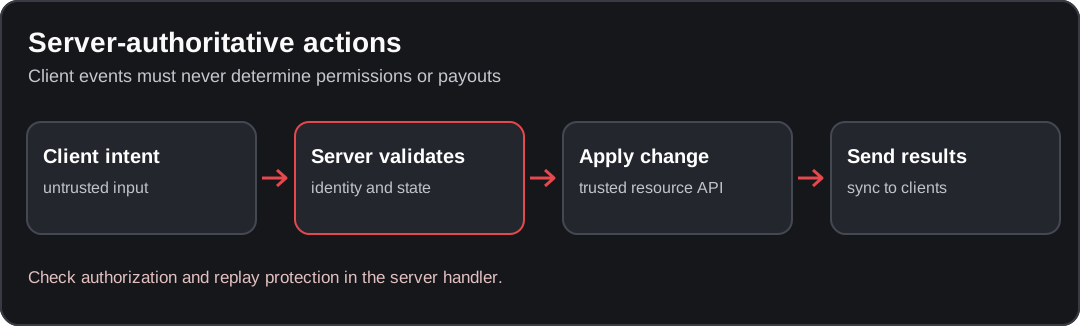
Conceptual diagram; verify the behavior against your installed resource version.
Define the job
Add an entry inside your existing qb-core/shared/jobs.lua jobs table:
['delivery'] = {
    label = 'Delivery',
    defaultDuty = true,
    offDutyPay = false,
    grades = {
        ['0'] = { name = 'Courier', payment = 0 }
    }
},
Zero salary avoids a second automatic paycheck in this task-paid demo. Adjust your economy
explicitly rather than silently paying salary and completion rewards together. Reload the affected
stack in staging after shared-data changes; refresh alone is not a Lua configuration reload.
Create the resource
Extract the archive so the resource folder is resources/[local]/docs-delivery, not a double-nested
folder. Add ensure docs-delivery after qb-core. Use /setjob <your-server-id> delivery 0 through
your authorized admin account. The character must be on duty.
config.lua owns the depot, three stops, 3-unit radius, 10-second minimum per stop, 15-minute route
lifetime, 60-second between-route cooldown and 200-bank reward. These are example values, not
official defaults or economy recommendations. Check the coordinates in your staging map first.
Keep assignment and payouts on the server
The server's session is keyed by connection ID and also stores the issued citizenid. Completion
requires the same character, the configured job, on-duty status and routing bucket 0. It validates
the expected stop number, server-observed proximity, minimum elapsed time and route expiry.
At the last stop, the server consumes the route before calling AddMoney. It checks the result
and does not claim payment succeeded on failure. Repeating a completed request cannot pay it again
inside this running process. Requests are throttled before expensive work.
This is not a durable transaction ledger or an anti-cheat. A crash during payment needs separate accounting/reconciliation. Cooldowns are connection-scoped and reset on disconnect; use durable character-level accounting before relying on them as an economic abuse limit. Server-observed proximity alone does not prove legitimate travel; stronger movement checks are a separate concern.
No NPC or vehicle is created by this example, so there is no unexplained client-owned entity to validate. Adding one requires its own ownership/network-ID design.
Add the client interaction
Travel to the depot at 78.7, 111.9, 81.2 and use /delivery. Follow the route blip, wait at least
the configured minimum time and press E at the marker. /deliverystop makes the same request
for keyboard troubleshooting. /deliverycancel cancels without a reward.
The server sends the next stop; the client replaces its previous blip. Nearby markers draw each frame, while the loop sleeps when no stop is nearby. Character unload and resource stop remove the resource's blip. Server cleanup handles logout, disconnect and incompatible job/duty changes.
Restarting the resource cancels unfinished routes. The example deliberately does not persist partial progress. To add a qb-target depot interaction, call the same start event; do not replace its server checks with client-only conditions.
Test the resource
| Staging test | Expected result |
|---|---|
| Wrong job, off duty, far from depot or wrong bucket | Start rejected |
| Start at depot with the assigned job | First stop appears |
| Complete immediately or from the wrong position | No advancement or payment |
| Send a future, previous or malformed stop number | No advancement |
| Complete three valid stops in order | Exactly one fixed bank reward |
| Repeat the final completion request | No second payment |
| Cancel, logout, change character/job or expire the route | Old route cannot pay |
| Restart during a route | Blip removed; unfinished route forgotten |
| Fail the mocked AddMoney call | No success message and no automatic replay |
The repository's scripts/examples/test-complete-tutorials.lua executes the real server files with
mocked core/natives to cover these logic boundaries. That cannot verify map coordinates, entity
replication, UI rendering or actual bank persistence; run this matrix in FiveM before deployment.
Related guides
- Jobs reference
- Set job and grades
- Server authority checklist
- Resource load order
- OneSync and entities
Sources
Found an issue in this guide?
Send the page URL, the affected example, and a source or reproduction to the site maintainer. For a server or resource problem, use the support guide.
Clear FiveM Cache on Windows: Folder & Safe Steps
Find the FiveM cache folder on Windows, clear only the relevant cache directories, and keep game storage, settings and logs intact.
How to Create Money as Item in QBCore
Learn how to create physical money items that players can drop, trade, and pick up in your QBCore server.
