
Updated 2026-10-09 · 8 min read
QBCore Events: client and server reference
QBCore events let resources react when a character loads, their job changes, their money changes or a framework update is published. Client events, server network events and local server events are not interchangeable. Registering a handler is not permission to change player state.
This guide maps common integration tasks to qb-core commit 9b3cddc. For the complete event registration tables, use the client event reference and server event reference.
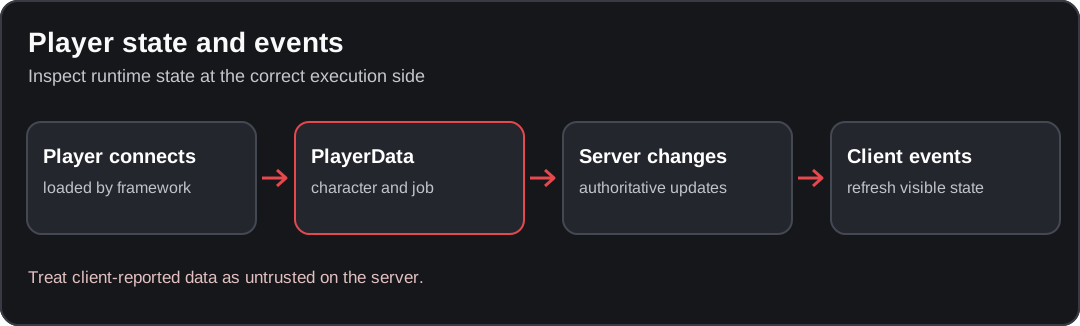
Conceptual diagram; verify the behavior against your installed resource version.
Quick reference: which QBCore event should I listen for?
For a custom resource, the Compatibility Analyzer can identify literal references to registered events and flag handlers absent from the selected files. An absent handler in the selection is not proof an event is missing from your running server.
| Situation | Event | Where to listen |
|---|---|---|
| Character is ready on the client | QBCore:Client:OnPlayerLoaded | Client |
| Character leaves / logs out | QBCore:Client:OnPlayerUnload | Client |
| Server has created/loaded a Player object | QBCore:Server:PlayerLoaded | Server (local) |
| Server is unloading a player | QBCore:Server:OnPlayerUnload | Server (local) |
| PlayerData was replaced | QBCore:Player:SetPlayerData | Client (local); also emitted server-side on full updates |
| Player's job changed | QBCore:Client:OnJobUpdate | Client (local) |
| Player's gang changed | QBCore:Client:OnGangUpdate | Client (local) |
| Bank/cash changed | QBCore:Client:OnMoneyChange | Client |
| Server needs to observe money updates | QBCore:Server:OnMoneyChange | Server (local) |
| A shared core definition changed | QBCore:Client:UpdateObject | Client (local) |
Use AddEventHandler for a local event emitted by the current runtime. Use RegisterNetEvent
only when the event genuinely needs to cross the network boundary. The core's own handlers are
defined in client/events.lua,
server/events.lua
and server/player.lua.
Player Events
Client-Side Player Events
QBCore:Client:OnPlayerLoaded
Use this when the local character has finished its framework load sequence. The upstream client
handler sets LocalPlayer.state.isLoggedIn and applies the configured PVP state.
-- client.lua; register a listener, not a second core event implementation
local QBCore = exports['qb-core']:GetCoreObject({ 'Functions' })

AddEventHandler('QBCore:Client:OnPlayerLoaded', function()
    local data = QBCore.Functions.GetPlayerData()
    if not data or not data.job then return end

    print(('My current job: %s'):format(data.job.name))
end)
Use GetPlayerData after the load event;
do not read charinfo or job before they are initialized.
QBCore:Client:OnPlayerUnload
Clear your resource's local state when a player logs out or switches characters. The core
updates LocalPlayer.state.isLoggedIn in its own handler. Do not call this event as a shortcut
for server logout.
-- client.lua
local cachedJob = nil

AddEventHandler('QBCore:Client:OnPlayerUnload', function()
    cachedJob = nil
end)
QBCore:Player:SetPlayerData
This local event is emitted after a full player-data update. The pinned client receives
QBCore:Client:OnPlayerUpdated with the key all, replaces its data and then emits
QBCore:Player:SetPlayerData. Smaller updates may instead arrive as one keyed field, so
do not assume this full-data event fires for every metadata or money change.
Server-Side Player Events
QBCore:Server:OnPlayerLoaded
This is a network handler in the core. It checks that a Player is present for the calling
source before emitting the client-side loaded event. It is not the same as the local
QBCore:Server:PlayerLoaded integration event that the server-side Player loader emits.
To react to a loaded Player object on the server, listen for the latter:
-- server.lua
AddEventHandler('QBCore:Server:PlayerLoaded', function(Player)
    if not Player or not Player.PlayerData then return end

    -- Read-only example; do not trigger login again.
    print(('QBCore character loaded from source %s'):format(Player.PlayerData.source))
end)
QBCore:Server:PlayerLoggedOut
This old event name is not emitted by the pinned core. Use
QBCore:Server:OnPlayerUnload with the player source, or
QBCore:Server:PlayerDropped for a network disconnect. Both are local server events.
See multicharacter loading for login-flow
problems.
Job Events
Job Update Events
QBCore:Client:OnJobUpdate
The pinned client's player-data update handler emits this locally when the job changes. The handler receives the job table, not a player source or arbitrary job name.
-- client.lua
AddEventHandler('QBCore:Client:OnJobUpdate', function(job)
    if not job then return end
    local canAccessPoliceUI = job.name == 'police' and job.onduty == true
    -- Keep this variable local to your UI; the server must authorize real actions.
end)
QBCore:Client:SetDuty
The pinned QBCore:ToggleDuty server handler emits this client event with a Boolean duty state.
A direct call to Player.Functions.SetJobDuty updates PlayerData and can emit a job update
instead; do not assume every code path sends the same duty event.
Server-Side Job Events
QBCore:Server:OnJobUpdate
The core's QBCore:Server:OnPlayerUpdated dispatcher emits this local server event with
source, job when the job field changes, including full-data refreshes. Observe it, but
re-read the authoritative Player and check permissions before performing protected work.
Gang Events
Gang Update Events
QBCore:Client:OnGangUpdate
Receives the current gang table. The matching local server integration event is
QBCore:Server:OnGangUpdate (source, gang). See
gang/player data for the actual data shape.
Money Events
Money Update Events
hud:client:UpdateMoney
This is not a qb-core event in the pinned revision. The upstream Player methods notify the
HUD through hud:client:OnMoneyChange, with a different payload. HUD installations can replace
these events entirely. Use the core integration event below for framework-level listeners.
QBCore:Client:OnMoneyChange
Sent by Player:AddMoney, Player:RemoveMoney and Player:SetMoney:
| Argument | Type | Meaning |
|---|---|---|
moneyType | string | e.g. cash or bank |
amount | number | Amount passed to the money method; for set, the new balance |
operation | string | add, remove or set |
reason | string | Caller-supplied audit reason |
-- client.lua: update a display only, never authorize a purchase
AddEventHandler('QBCore:Client:OnMoneyChange', function(moneyType, amount, operation)
    if moneyType == 'bank' then
        print(('Bank changed via %s'):format(operation))
    end
end)
The analogous local server event is
QBCore:Server:OnMoneyChange(source, moneyType, amount, operation, reason).
Use Player.Functions money APIs for actual changes,
not a client-triggered notification.
Vehicle Events
Vehicle Interaction Events
QBCore:Client:VehicleInfo
An internal core vehicle/baseevents bridge. Its payload is an info table containing the
vehicle and transition data. This is not an authoritative request to spawn or grant a vehicle.
QBCore:Client:EnteredVehicle
Older resources may emit this name, but it is not registered/emitted by the verified core
client/server event files. Do not depend on it without inspecting the resource that supplies
it; use Cfx baseevents or the appropriate gameplay resource when vehicle entry is your task.
QBCore:Client:LeftVehicle
The same caveat applies to this legacy name. Compare the installed event source before adding a listener.
Inventory Events
Item Events
QBCore:Client:OnUseItem
Not emitted by the pinned qb-core event files. Usable-item callbacks are registered on
the server with QBCore.Functions.CreateUseableItem; the inventory resource handles the
interaction. Follow the usable item guide.
QBCore:Client:ItemBox
Also not a current core event. The inventory UI owns its item box notifications.
Inventory Management Events
inventory:client:ItemBox
An event belonging to qb-inventory, not a universal QBCore event. The exact parameters depend on the inventory revision; see qb-inventory functions and events.
Status Events
Needs Events (Hunger, Thirst, Stress)
hud:client:UpdateNeeds
The pinned server's QBCore:UpdatePlayer handler updates hunger/thirst metadata and emits
hud:client:UpdateNeeds with hunger, thirst. This is an integration with a HUD, not a
general contract for every replacement status system.
hud:client:UpdateStress
Stress changes are usually owned by a HUD or gameplay resource. Do not treat this as a
core-supported event without checking your installed qb-hud and stress implementation.
Notification Events
Standard Notifications
QBCore:Notify
The client-side core registers QBCore:Notify(text, type, length, icon) and forwards it to
QBCore.Functions.Notify. To notify a specific player from the server, prefer
QBCore.Functions.Notify(source, text, type, length); to notify locally, use the client
QBCore.Functions.Notify(text, type, length, icon).
See client functions for the current notification shape.
QBCore:Command:Update
This older identifier is not part of the pinned core's registered client events. Use commands to register and refresh the supported command interface.
System Events
Framework Events
QBCore:Client:UpdateObject
A local client event emitted after the core applies shared data updates. If your resource keeps a cached core object, re-acquire the export after receiving it.
QBCore:Server:UpdateObject
A local server event fired by the shared mutation API after jobs/items/gangs or methods are updated. It carries no payload at the pinned revision. Read shared mutation exports before using runtime mutations.
Internal transports such as QBCore:Server:TriggerCallback,
QBCore:Client:TriggerCallback, and QBCore:Client:OnPlayerUpdated are framework
implementation paths. Do not dispatch these to simulate money, player or authorization changes.
Custom Event Examples
Creating Custom Events
A custom network event is a request across a trust boundary. For a read-only status lookup,
get the caller from server source and confirm a loaded character exists:
Server-Side Custom Event
-- server.lua
local QBCore = exports['qb-core']:GetCoreObject({ 'Functions' })

RegisterNetEvent('myresource:server:requestJobName', function()
    local src = source
    local Player = QBCore.Functions.GetPlayer(src)
    if not Player then return end

    TriggerClientEvent('myresource:client:receiveJobName', src, Player.PlayerData.job.name)
end)
Client-Side Custom Event
-- client.lua
RegisterNetEvent('myresource:client:receiveJobName', function(jobName)
    if type(jobName) ~= 'string' then return end
    print(('Current job: %s'):format(jobName))
end)

TriggerServerEvent('myresource:server:requestJobName')
This example does not change data. For anything involving items, money, vehicles, permissions or jobs, verify the caller's entitlement, server-owned state, distance, allowed values, replay limits and transaction behavior on the server. Prefer existing supported exports over a new privileged event.
Event Best Practices
Verify a listener in a test server
-
Register a read-only client listener in your own resource's
client.lua, afterqb-corehas started:AddEventHandler('QBCore:Client:OnJobUpdate', function(job) if not job or not job.name then return end print(('Job updated: %s'):format(job.name)) end) -
Start the resource after
qb-core. Log in to a test character and use a server-authorized job change to trigger the event. Check the F8 console. -
Test logout and reconnect. Make sure your own cached state is cleared and no stale UI access survives a character change. Client-side output is not proof of server authorization.
Performance Tips
- Register handlers once at resource startup; do not register a new listener on every UI open.
- Prefer state/job-change signals to polling every frame.
- Remove your own cached per-player state when the player drops or unloads.
- Profile first if the event path is expensive; see performance investigation.
Security Considerations
- Treat every client-sent event and callback argument as untrusted, including a player ID, amount, item name, job grade or location.
- Use the server's
sourcefor the caller and check its current Player; a displayed role or client-side job event grants no privileges. - When access is restricted, use appropriate ACE checks such as
IsPlayerAceAllowedand enforce permissions for the exact operation. - Never copy examples that grant money because the client's job name equals
admin. - Exercise malformed requests, replay, disconnects and insufficient funds in a test server using the server authority checklist.
Sources
- qb-core client/events.lua
- qb-core server/events.lua
- qb-core server/player.lua
- qb-core shared mutation exports
Source reviewed on 2026-10-09. Handler snippets are examples based on the pinned source, not proof that they were run on a live FiveM staging server. Verify your deployed core and resource-specific event names before shipping integrations.
Found an issue in this guide?
Send the page URL, the affected example, and a source or reproduction to the site maintainer. For a server or resource problem, use the support guide.
