qb-inventory Guide for QBCore
The qb-inventory resource handles QBCore player inventories, stashes, drops, vehicle storage, shop inventory, usable items, item metadata, and weight limits. Use this guide when you need to install qb-inventory, fix missing items, tune carry weight, or connect custom scripts to the official inventory exports.
For a normal QBCore server, start qb-inventory after qb-core and before resources
that depend on inventory data, such as shops, housing, weapons, jobs, and custom stash
scripts. If the UI opens but items are missing, check shared/items.lua, item image
names, weight values, and the inventory database migration first.
Common Search Paths
| If you searched for | Start here |
|---|---|
qb-inventory or qb inventory | Installation, load order, configuration, and database setup below |
qbcore inventory script | Core features, storage types, and related marketplace options |
fivem qb inventory | Player inventory, trunk, glovebox, stash, and shop setup |
qb inventory not opening | Troubleshooting, resource order, and inv_busy checks |
qb inventory exports | Events & functions reference |
Overview
qb-inventory replaces the default GTA V inventory experience with a grid-based interface for player items, drops, crafting, trading, and storage. It is also the resource other scripts call when they need to add, remove, check, open, save, or clear items.
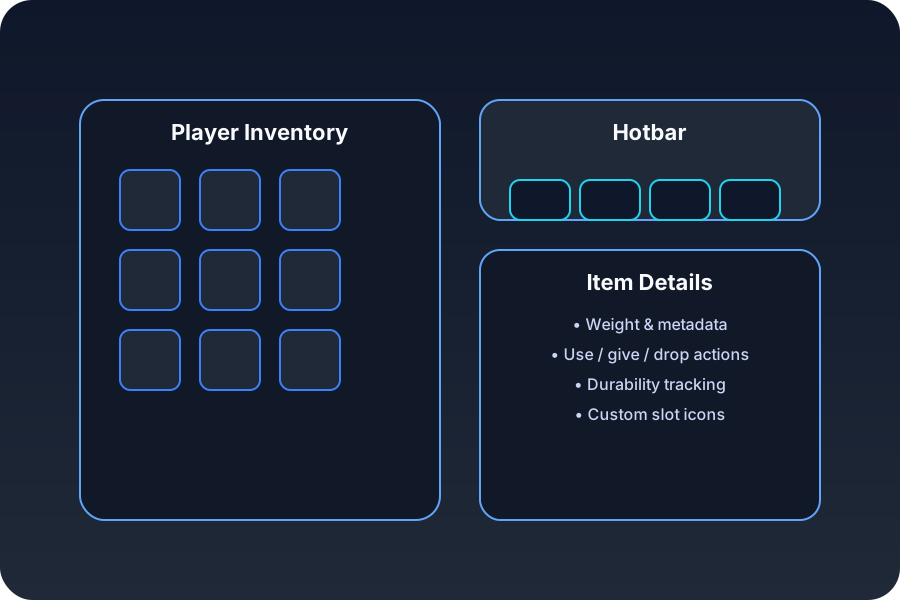
QB-Inventory main interface with drag-and-drop functionality
Key Features
- Modern UI: Drag-and-drop grid-based interface for player inventory
- Weight System: Realistic item weights and carrying capacity
- Hotbar Integration: Quick access slots for frequently used items
- Item Stacking: Automatic stacking of similar items
- Inventory Types: Player, vehicle trunk, glovebox, stash, drop, house, and custom storage inventories
- Item Durability: Degradation system for weapons and tools
- Crafting System: Built-in crafting interface and recipes
- Trading System: Secure player-to-player item trading
- Shop Integration: Works with QBCore shop flows and custom shop registrations
Official Inventory API
Most integration work should use the inventory exports/events instead of editing inventory state manually. The most common tasks are:
| Task | Use |
|---|---|
| Add or remove items | AddItem, RemoveItem |
| Check whether a player has an item | HasItem |
| Open a stash, shop, or player inventory | OpenInventory, OpenShop, OpenInventoryById |
| Save or clear inventory data | SaveInventory, ClearInventory, ClearStash |
| Lock inventory while a player is busy | inv_busy state bag |
See the qb-inventory events and functions reference for code examples and migration notes.
Installation
Prerequisites
- QBCore Framework
- qb-target (for inventory interactions)
- qb-weapons (for weapon durability)
Installation Steps
- Download the Resource
cd resources/[qb]
git clone https://github.com/qbcore-fivem/qb-inventory.git-
Replace Core Inventory
QB-Inventory replaces the default QBCore inventory system. Make sure to:
- Remove or disable any other inventory resources
- Update qb-core configuration to use qb-inventory
-
Database Setup
-- Update items table structure
ALTER TABLE `player_items` ADD COLUMN `metadata` longtext DEFAULT '{}';
ALTER TABLE `player_items` ADD COLUMN `created` timestamp DEFAULT current_timestamp();

-- Create additional tables if needed
CREATE TABLE IF NOT EXISTS `stashitems` (
  `stash` varchar(255) NOT NULL,
  `items` longtext CHARACTER SET utf8mb4 COLLATE utf8mb4_bin DEFAULT NULL CHECK (json_valid(`items`)),
  PRIMARY KEY (`stash`)
);

CREATE TABLE IF NOT EXISTS `trunkitems` (
  `plate` varchar(255) NOT NULL,
  `items` longtext CHARACTER SET utf8mb4 COLLATE utf8mb4_bin DEFAULT NULL CHECK (json_valid(`items`)),
  PRIMARY KEY (`plate`)
);

CREATE TABLE IF NOT EXISTS `gloveboxitems` (
  `plate` varchar(255) NOT NULL,
  `items` longtext CHARACTER SET utf8mb4 COLLATE utf8mb4_bin DEFAULT NULL CHECK (json_valid(`items`)),
  PRIMARY KEY (`plate`)
);- Add to server.cfg
ensure qb-inventory- Restart Server
restart qb-inventoryqb-inventory must load after qb-core and before any resources that depend on inventory functions.
Configuration
Basic Configuration
The main configuration file is located at config.lua:
Config = {}

-- General settings
Config.UseTarget = GetConvar('UseTarget', 'false') == 'true'
Config.MaxInventoryWeight = 120000 -- Maximum weight in grams
Config.MaxInventorySlots = 41

-- For detailed weight balancing across different item types and
-- advanced metadata handling, see: https://fivemx.com/inventory-weight-tuning/

-- Hotbar configuration
Config.Hotbar = {
    slots = 5,
    keys = {
        [1] = {key = 'slot1', description = 'Use Item Slot 1'},
        [2] = {key = 'slot2', description = 'Use Item Slot 2'},
        [3] = {key = 'slot3', description = 'Use Item Slot 3'},
        [4] = {key = 'slot4', description = 'Use Item Slot 4'},
        [5] = {key = 'slot5', description = 'Use Item Slot 5'}
    }
}

-- Vehicle storage configuration
Config.VehicleLimit = {
    [0] = 38000,  -- Compacts
    [1] = 45000,  -- Sedans
    [2] = 65000,  -- SUVs
    [3] = 35000,  -- Coupes
    [4] = 40000,  -- Muscle
    [5] = 35000,  -- Sports Classics
    [6] = 30000,  -- Sports
    [7] = 25000,  -- Super
    [8] = 15000,  -- Motorcycles
    [9] = 50000,  -- Off-road
    [10] = 80000, -- Industrial
    [11] = 70000, -- Utility
    [12] = 60000, -- Vans
    [13] = 5000,  -- Cycles
    [14] = 85000, -- Boats
    [15] = 50000, -- Helicopters
    [16] = 75000, -- Planes
}

-- Trunk and glovebox configuration
Config.GloveboxLimit = 10000 -- Weight limit for gloveboxes
Config.TrunkLimit = Config.VehicleLimit -- Uses vehicle class limits

-- Durability settings
Config.ItemDurability = true
Config.DurabilityBlockedItems = {
    'phone',
    'money',
    'radio'
}
Item Configuration
Items are configured in shared/items.lua:
QBShared = QBShared or {}
QBShared.Items = {
    -- Weapons
    ['weapon_pistol'] = {
        ['name'] = 'weapon_pistol',
        ['label'] = 'Pistol',
        ['weight'] = 1000,
        ['type'] = 'weapon',
        ['ammotype'] = 'AMMO_PISTOL',
        ['image'] = 'weapon_pistol.png',
        ['unique'] = true,
        ['useable'] = false,
        ['description'] = 'A small firearm'
    },

    -- Consumables
    ['sandwich'] = {
        ['name'] = 'sandwich',
        ['label'] = 'Sandwich',
        ['weight'] = 200,
        ['type'] = 'item',
        ['image'] = 'sandwich.png',
        ['unique'] = false,
        ['useable'] = true,
        ['shouldClose'] = true,
        ['combinable'] = nil,
        ['description'] = 'Nice bread for your stomach'
    },

    -- Tools
    ['lockpick'] = {
        ['name'] = 'lockpick',
        ['label'] = 'Lockpick',
        ['weight'] = 300,
        ['type'] = 'item',
        ['image'] = 'lockpick.png',
        ['unique'] = false,
        ['useable'] = true,
        ['shouldClose'] = true,
        ['combinable'] = nil,
        ['description'] = 'Very useful if you lose your keys a lot'
    }
}
Crafting Configuration
Config.Crafting = {
    enabled = true,
    locations = {
        {coords = vector3(1275.55, -1710.46, 54.77), radius = 5.0},
        {coords = vector3(-330.40, -141.76, 39.01), radius = 3.0}
    }
}

Config.CraftingItems = {
    ['lockpick'] = {
        ['materials'] = {
            ['metalscrap'] = 22,
            ['plastic'] = 32,
        },
        ['amount'] = 1,
        ['points'] = 1,
        ['time'] = 15000, -- 15 seconds
    },
    ['repairkit'] = {
        ['materials'] = {
            ['metalscrap'] = 32,
            ['steel'] = 43,
            ['plastic'] = 61,
        },
        ['amount'] = 1,
        ['points'] = 3,
        ['time'] = 30000, -- 30 seconds
    }
}
API Reference
Client Exports
OpenInventory
Opens the inventory interface.
-- Open player inventory
exports['qb-inventory']:OpenInventory()

-- Open specific inventory type
exports['qb-inventory']:OpenInventory('trunk', 'ABC123')
exports['qb-inventory']:OpenInventory('stash', 'personalstash_123')
HasItem
Checks if player has a specific item.
-- Check for single item
local hasItem = exports['qb-inventory']:HasItem('phone')

-- Check for multiple items
local hasItems = exports['qb-inventory']:HasItem({'phone', 'money'}, true) -- true = need all items
GetItemCount
Gets the count of a specific item.
-- Get item count
local phoneCount = exports['qb-inventory']:GetItemCount('phone')
print("You have " .. phoneCount .. " phones")
Server Exports
AddItem
Adds an item to a player’s inventory.
-- Add basic item
exports['qb-inventory']:AddItem(source, 'phone', 1)

-- Add item with metadata
exports['qb-inventory']:AddItem(source, 'weapon_pistol', 1, false, {
    durability = 100,
    ammo = 12,
    serial = 'ABC123XYZ'
})
RemoveItem
Removes an item from a player’s inventory.
-- Remove basic item
exports['qb-inventory']:RemoveItem(source, 'phone', 1)

-- Remove specific item by slot
exports['qb-inventory']:RemoveItem(source, 'phone', 1, 5) -- slot 5
GetItemsByName
Gets all items of a specific name.
-- Get all phones in inventory
local phones = exports['qb-inventory']:GetItemsByName(source, 'phone')
for k, v in pairs(phones) do
    print("Phone in slot " .. v.slot .. " with " .. v.amount .. " quantity")
end
SetItemDurability
Sets the durability of an item.
-- Set weapon durability
exports['qb-inventory']:SetItemDurability(source, 'weapon_pistol', 75.5)
Events
Client Events
-- Inventory events
RegisterNetEvent('qb-inventory:client:openInventory', function(inventoryType, inventoryId)
    -- Handle inventory opening
end)

RegisterNetEvent('qb-inventory:client:closeInventory', function()
    -- Handle inventory closing
end)

-- Item events
RegisterNetEvent('qb-inventory:client:useItem', function(itemName, item)
    -- Handle item usage
end)

RegisterNetEvent('qb-inventory:client:itemBox', function(itemData, type)
    -- Handle item notifications (add/remove)
end)
Server Events
-- Item management
RegisterNetEvent('qb-inventory:server:addItem', function(itemName, amount, slot, info))
RegisterNetEvent('qb-inventory:server:removeItem', function(itemName, amount, slot))

-- Inventory actions
RegisterNetEvent('qb-inventory:server:openInventory', function(inventoryType, inventoryId))
RegisterNetEvent('qb-inventory:server:closeInventory', function())

-- Trading system
RegisterNetEvent('qb-inventory:server:tradeItems', function(targetId, items))
Usage Examples
Basic Item Management
-- Give starting items to new players
RegisterNetEvent('QBCore:Server:PlayerLoaded', function(Player)
    local src = Player.PlayerData.source

    -- Give basic items
    exports['qb-inventory']:AddItem(src, 'phone', 1)
    exports['qb-inventory']:AddItem(src, 'money', 500)
    exports['qb-inventory']:AddItem(src, 'id_card', 1, false, {
        citizenid = Player.PlayerData.citizenid,
        name = Player.PlayerData.charinfo.firstname .. ' ' .. Player.PlayerData.charinfo.lastname
    })
end)
Custom Inventory Slots
-- Create custom stash
RegisterNetEvent('housing:server:openStash', function(houseId)
    local src = source
    local Player = QBCore.Functions.GetPlayer(src)

    if Player then
        local stashName = 'house_' .. houseId
        exports['qb-inventory']:OpenInventory(src, 'stash', stashName, {
            maxweight = 50000,
            slots = 25
        })
    end
end)
Weapon Durability System
-- Weapon degradation on use
RegisterNetEvent('weapons:server:useWeapon', function(weaponName)
    local src = source
    local Player = QBCore.Functions.GetPlayer(src)
    local weapon = Player.Functions.GetItemByName(weaponName)

    if weapon and weapon.info.durability then
        local newDurability = weapon.info.durability - math.random(1, 5)

        if newDurability <= 0 then
            Player.Functions.RemoveItem(weaponName, 1, weapon.slot)
            TriggerClientEvent('QBCore:Notify', src, 'Your weapon broke!', 'error')
        else
            exports['qb-inventory']:SetItemDurability(src, weaponName, newDurability)
        end
    end
end)
Crafting System Integration
-- Custom crafting event
RegisterNetEvent('crafting:server:craftItem', function(itemName)
    local src = source
    local Player = QBCore.Functions.GetPlayer(src)
    local recipe = Config.CraftingItems[itemName]

    if recipe then
        local canCraft = true

        -- Check materials
        for material, amount in pairs(recipe.materials) do
            if not exports['qb-inventory']:HasItem(src, material, amount) then
                canCraft = false
                break
            end
        end

        if canCraft then
            -- Remove materials
            for material, amount in pairs(recipe.materials) do
                exports['qb-inventory']:RemoveItem(src, material, amount)
            end

            -- Add crafted item
            exports['qb-inventory']:AddItem(src, itemName, recipe.amount)
            TriggerClientEvent('QBCore:Notify', src, 'Successfully crafted ' .. itemName, 'success')
        else
            TriggerClientEvent('QBCore:Notify', src, 'Missing materials', 'error')
        end
    end
end)
Vehicle Storage Integration
-- Open vehicle trunk
RegisterNetEvent('qb-inventory:server:openTrunk', function(plate)
    local src = source
    local Player = QBCore.Functions.GetPlayer(src)

    if Player then
        exports['qb-inventory']:OpenInventory(src, 'trunk', plate, {
            maxweight = GetVehicleMaxWeight(plate),
            slots = 20
        })
    end
end)

-- Custom vehicle weight calculation
function GetVehicleMaxWeight(plate)
    local vehicle = GetVehicleByPlate(plate)
    if vehicle then
        local class = GetVehicleClass(vehicle)
        return Config.VehicleLimit[class] or 50000
    end
    return 50000
end
Trading System
-- Secure item trading
RegisterNetEvent('trading:server:offerTrade', function(targetId, items)
    local src = source
    local Player = QBCore.Functions.GetPlayer(src)
    local TargetPlayer = QBCore.Functions.GetPlayer(targetId)

    if Player and TargetPlayer then
        -- Validate items exist
        local validTrade = true
        for _, item in pairs(items) do
            if not exports['qb-inventory']:HasItem(src, item.name, item.amount) then
                validTrade = false
                break
            end
        end

        if validTrade then
            TriggerClientEvent('trading:client:receiveOffer', targetId, {
                from = src,
                items = items,
                player = Player.PlayerData.charinfo
            })
        end
    end
end)
Administrative Commands
Player Commands
/inv- Open inventory (if not using item)/hotbar- Toggle hotbar visibility/clearinv- Clear inventory (admin only)
Admin Commands
/giveitem [id] [item] [amount]- Give item to player/removeitem [id] [item] [amount]- Remove item from player/clearinventory [id]- Clear player’s inventory/setweight [id] [weight]- Set player’s carrying capacity
Console Commands
# Give item to player
giveitem 1 phone 1

# Remove item from player
removeitem 1 phone 1

# Clear player inventory
clearinventory 1
Integration with Other Resources
qb-weapons Integration
Weapon attachment and ammo system:
-- Weapon with attachments
local weaponData = {
    durability = 100,
    ammo = 30,
    attachments = {
        {component = 'COMPONENT_AT_PI_FLSH', label = 'Flashlight'},
        {component = 'COMPONENT_PISTOL_CLIP_02', label = 'Extended Clip'}
    },
    serial = GenerateSerial()
}

exports['qb-inventory']:AddItem(source, 'weapon_pistol', 1, false, weaponData)
qb-shops Integration
Shop inventory management:
-- Shop purchase with inventory check
RegisterNetEvent('qb-shops:server:purchaseItem', function(itemName, amount, price)
    local src = source
    local Player = QBCore.Functions.GetPlayer(src)

    if Player.Functions.RemoveMoney('cash', price * amount) then
        exports['qb-inventory']:AddItem(src, itemName, amount)
        TriggerClientEvent('QBCore:Notify', src, 'Purchase successful', 'success')
    else
        TriggerClientEvent('QBCore:Notify', src, 'Insufficient funds', 'error')
    end
end)
qb-housing Integration
House storage system:
-- House stash access
RegisterNetEvent('qb-houses:server:openStash', function(houseId)
    local src = source
    local Player = QBCore.Functions.GetPlayer(src)

    if HasHouseAccess(Player.PlayerData.citizenid, houseId) then
        exports['qb-inventory']:OpenInventory(src, 'stash', 'house_' .. houseId, {
            maxweight = 500000,
            slots = 50
        })
    end
end)
Troubleshooting
Common Issues
Items Not Saving
Problem: Items disappear after server restart.
Solutions:
- Check database connection
- Verify table structure
- Check for inventory save errors in server console
-- Debug item saving
RegisterCommand('debuginv', function()
    local src = source
    local Player = QBCore.Functions.GetPlayer(src)

    print("Player items count: " .. #Player.PlayerData.items)
    for slot, item in pairs(Player.PlayerData.items) do
        print("Slot " .. slot .. ": " .. item.name .. " x" .. item.amount)
    end
end, false)
Weight Issues
Problem: Can’t pick up items due to weight restrictions.
Solution:
-- Check current weight
RegisterCommand('weight', function()
    local src = source
    local Player = QBCore.Functions.GetPlayer(src)
    local currentWeight = exports['qb-inventory']:GetCurrentWeight(src)
    local maxWeight = Config.MaxInventoryWeight

    print("Current weight: " .. currentWeight .. "/" .. maxWeight)
    TriggerClientEvent('QBCore:Notify', src, 'Weight: ' .. math.floor(currentWeight/1000) .. 'kg / ' .. math.floor(maxWeight/1000) .. 'kg')
end, false)
Hotbar Not Working
Problem: Hotbar items don’t activate when pressed.
Solutions:
- Check keybinding configuration
- Verify item usability settings
- Check for conflicting resources
-- Debug hotbar usage
RegisterKeyMapping('slot1', 'Use Hotbar Slot 1', 'keyboard', '1')
RegisterCommand('+slot1', function()
    local Player = QBCore.Functions.GetPlayerData()
    local item = Player.items[1]

    if item then
        print("Using item: " .. item.name)
        TriggerEvent('qb-inventory:client:useItem', item.name, item)
    end
end, false)
Performance Optimization
-- Optimize inventory updates
Config.UpdateInterval = 1000 -- Update every second instead of real-time
Config.MaxHistoryEntries = 50 -- Limit transaction history

-- Disable features if not needed
Config.Durability = false -- Disable durability system
Config.Crafting.enabled = false -- Disable crafting
Config.VehicleInventory = false -- Disable vehicle storage
Related Resources
- qb-core - Core framework functions
- qb-shops - Shopping system integration
- qb-weapons - Weapon system integration
- qb-houses - Housing storage system
- qb-target - Interaction system
Support
For issues and feature requests:
-
GitHub: qb-inventory Repository
-
Documentation: QBCore Docs
Related Inventory Scripts on FiveMX
Paid inventory listings on the FiveMX marketplace, for comparison against the free resources documented above.
These are third-party listings. qbcore.net does not sell, test, or endorse them, and does not track their price or availability. Check the seller page for current details.
Updating an existing install and hitting weight or hotbar issues? See troubleshoot qb-inventory updates.