
Updated 2026-09-21 · 5 min read
qb-target redesign: customize the interaction UI
A qb-target redesign changes the eye, option cards and interaction labels. You do not need to replace zones, Lua exports or gameplay events to change those visuals. This walkthrough supplies an original CSS example and explains how to install, inspect and remove it.
Baseline: qb-target a3ea78b2. These are source-reviewed instructions, not a claim of completed FiveM runtime testing. Compare your installed fork first. To create interactions rather than restyle them, use the qb-target API guide.
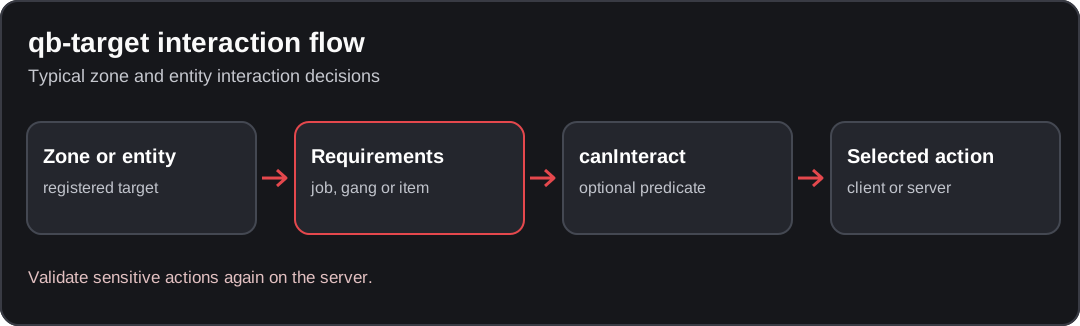
Conceptual diagram; verify the behavior against your installed resource version.
Files to inspect before editing
| File | Responsibility | Change for this example? |
|---|---|---|
html/index.html | Loads the NUI scripts and styles | Add one stylesheet link |
html/style.css | Upstream appearance and closed-state rules | Leave intact |
html/app.js | Messages, option IDs, selection and close callbacks | Leave intact |
html/qbnet-theme.css | Your isolated visual override | Create this file |
fxmanifest.lua | Packages the frontend files | Check the CSS wildcard |
The manifest includes html/*.css. The HTML uses target-wrapper, target-eye, target-label-wrapper and target-label. Do not rename these integration points.
Record your resource revision and save an unmodified copy. Test on staging rather than restarting a populated server for visual experiments.
Make a small, reversible CSS change
Download the original qb-target CSS example, or create html/qbnet-theme.css with the following content:
/* qbcore.net example for qb-target a3ea78b2; not a complete resource. */
:root {
  --md-on-surface: #f1f5f9;
  --md-success: #7dd3fc;
  --md-surface-container-high: #18202f;
  --md-surface-container-highest: #243249;
  --font-primary: Arial, sans-serif;
  --md-typescale-label-medium-size: 14px;
}

#target-label {
  max-width: min(24rem, 42vw);
  white-space: normal;
  overflow-wrap: anywhere;
  line-height: 1.45;
}

#target-label [id^='target-option-'] {
  margin-bottom: 0.35rem;
  padding: 0.55rem 0.75rem;
  border-radius: 0.5rem;
}

#target-label [id^='target-option-'] > span {
  pointer-events: none;
}

@media (prefers-reduced-motion: reduce) {
  #target-eye,
  #target-label [id^='target-option-'] {
    transition: none;
    transform: none;
  }

  #target-eye {
    transform: translate(-50%, -50%);
  }
}
Add this after the existing style.css link in html/index.html:
<link rel="stylesheet" href="qbnet-theme.css" />The pinned manifest's CSS wildcard packages this filename; a modified manifest must include it explicitly. Keep the original stylesheet loaded first. This is a CSS example, not a replacement target resource or a promise of compatibility with other forks.
Why eye colors use variables
The upstream JavaScript assigns the normal and active colors using --md-on-surface and --md-success. The stylesheet also gives .target-success an important color declaration. Changing only #target-eye { color: ... } can therefore appear to work in one state and fail in another. Override the variables rather than adding competing important declarations.
The icon spans use pointer-events: none so a click lands on the containing option. At this baseline the mouse handler inspects event.target.id; a decorative nested element without a compatible ID can otherwise behave differently from the option label. Test the icon, text and padded area separately.
Keep the callback contract
The upstream interface has specific messages and endpoints:
| Direction | Names | Preserve |
|---|---|---|
| Game to NUI | openTarget, foundTarget, validTarget, leftTarget, closeTarget | response message routing and the appropriate option data |
| NUI to game | selectTarget | Selected option index, not the visible label |
| NUI to game | leftTarget, closeTarget | Exit handling and restoration of controls |
These names come from the pinned app.js. Do not rename the resource or hardcode another callback host as part of a theme. Use Cfx.re NUI callbacks when intentionally changing the interface; a callback must receive its response.
Do not force the eye to display: block, remove role checks, or show every option just to make a screenshot. A normal browser preview is a layout check, not proof that selecting an action works in FiveM. Server-side authorization still belongs in the gameplay handler.
Icons and new assets
The pinned HTML loads Font Awesome from a CDN. In NUI developer tools, inspect the stylesheet request and the computed font before changing an icon class. A blocked font request is not a broken target registration.
Open the in-game NUI inspector as described in Cfx.re's fullscreen NUI guide. Select the qb-target frame. Confirm that qbnet-theme.css loads successfully and inspect its computed rules. New fonts or SVGs need their own packaged paths; html/*.css does not package arbitrary image extensions.
Acceptance checks before rollout
| Test on staging | Expected result | Failure points to inspect |
|---|---|---|
| Connect without opening target | No eye or option cards remain visible | Visibility overrides |
| Open away from any interaction | Normal eye; no leftover options | Open/left messages |
| Approach a known working zone | Active eye and the permitted options | Color variables, range and conditions |
| Click icon, label and card padding | Each selects the same option exactly once | Option IDs and pointer targets |
| Select among several options | Correct action, not the first item every time | Selected index |
| Leave range, close, then reopen | Old options disappear; controls return | Close/left callbacks |
| Use an unauthorized job character | Restricted action remains unavailable | Client conditions and server checks |
| Try a long translated label and a narrow viewport | Text stays readable without covering the eye | Wrapping and width |
Repeat with one entity target and one zone, then reconnect. Record the resource commit, tested resolution and screenshots of closed, normal and active states. These are instructions to execute, not results already observed in-game.
Troubleshooting and rollback
Colors change until a target is found: inspect the active-state variable and .target-success, not just the base eye rule.
The icon is clickable differently from the label: inspect the actual clicked element and its ID. Do not replace the selection payload with a label string.
The old design remains: confirm the started resource directory, the loaded HTML and the CSS network response before clearing any caches.
The interface looks right but selection fails: compare untouched upstream JavaScript and Lua against your fork. Revert structural or callback changes first.
To roll back this example, remove its single stylesheet link and the added CSS file, then reconnect to staging. No zones, database tables or item records should change. Continue with safe updates, inventory reskinning or all tutorials.
Found an issue in this guide?
Send the page URL, the affected example, and a source or reproduction to the site maintainer. For a server or resource problem, use the support guide.
Pleb Masters Forge
Find GTA models with Pleb Masters Forge, check a vehicle on your FiveM client, distinguish names from hashes, and use the result in QBCore resources.
qb-inventory reskin
Apply an original qb-inventory CSS example, package the stylesheet, preserve Vue bindings and item data, and verify drag, use, shops and persistence.
